

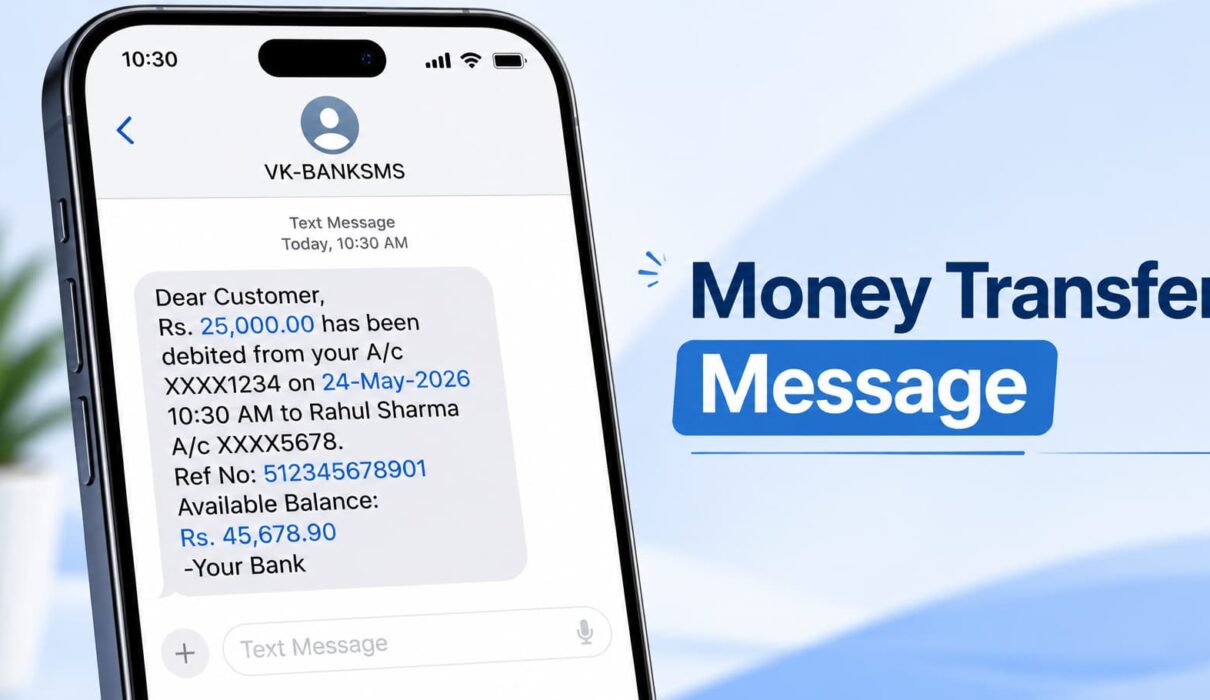
It’s that little SMS or app notification that shows up right after you send or receive cash. Rs.500 debited. Rs.2,000 credited. Boring, short, and honestly kind of forgettable. But it’s also the only real proof you have that a payment went through.
A friend of mine sold his old phone online a while back. The buyer sent him a screenshot, all green ticks, looked completely normal. He handed over the phone right there. The money never showed up. Turns out that screenshot took someone about two minutes to fake with a random app. That’s the whole reason this topic matters more than people give it credit for.
So let’s actually look at what a money transfer message is, what it should look like, and how you tell a real one from a fake.
What Is a Money Transfer Message, Really?

It’s just the confirmation your bank or payment app sends the second money moves. Nothing complicated about it.
Usually it comes as an SMS, sometimes a push notification, sometimes an email if the app is fancy. It tells you the amount, who was on the other end, and when it happened. A reference number shows up too, most of the time.
You don’t ask for it. It just arrives. Kind of like a digital receipt that lands in your pocket without you doing anything at all.
Most of us have gotten so used to these that we barely read the words anymore. We just glance, see a number, move on with the day. Which is honestly part of the problem, because a fake one slips right into that same pattern without raising any flags.
Why Bother Reading It at All
It’s tempting to just swipe it away. Don’t.
This tiny message is doing a few jobs at once:
- It’s your proof if a payment gets disputed later
- It flags fraud right away, if you get one for a transfer you never made, something’s off
- Small business owners use it to track daily cash without even opening an app
- And it just gives peace of mind. Money left, money arrived, done
Banks know this too. That’s why these messages have gotten faster and more detailed over the years. A decade back you’d wait hours for a confirmation text. Now it lands before you’ve even put the phone down.
The Different Kinds of Money Transfer Messages
They don’t all look the same. Depends where it’s coming from.
Bank SMS Money Transfer Message
This one’s plain, no frills. Something like: “Rs.5,000 debited from A/c XX1234 on 14-Aug-26. Info: UPI/John Doe. Avl Bal Rs.12,450.”
Banks keep it boring on purpose. Fewer words means fewer chances for a mistake. It’s not trying to look nice, just accurate.
UPI or App-Based Money Transfer Message

Apps like Google Pay or PhonePe dress it up a bit more. Green tick, bold name, sometimes a little animation. It’s built to feel instant, almost like the app wants you to feel good about paying someone.
Money Transfer Message for Business
A lot of freelancers write their own version to confirm payments manually. Something like: “Hi Raj, this confirms we’ve received your transfer of $250 for Invoice #102. Thanks!”
Nothing automated about it. Just a small human touch, and clients actually remember stuff like that.
Writing Your Own Money Transfer Message
If you’re confirming payments for clients, keep it short. No one wants to read a paragraph just to know their money arrived safely.
Four things is really all you need:
- The exact amount
- The date
- Who sent it and who received it
- A reference number, if there’s one
That’s the whole list. Skip anything that sounds like bank jargon. If you write it out and can’t understand it in three seconds, cut a few words and try again.
Some Templates You Can Just Copy
Tweak these however you need.
Sending money to a friend:
“Hey! Just sent you $100, should land by tomorrow. Let me know when it’s in.
Client payment verification:
“Just to inform you that we have received your payment of $ 500 as of Aug 14, 2026. Ref: TXN9284 Thanks for your business.
Notice of Vendor payment:
We just put $1,200 into your account ending in 4567. Please confirm when you see it.
Sharing a bill with roommates:
I sent my part, $60, for this months electric bill.Ping me if it doesn’t show up tonight.”
Fake Money Transfer Messages Happen More Than People Think

This is where it actually gets people.
Scammers fake a money transfer message and show it off as proof of payment. The seller hands over whatever they’re selling, and the money just never shows up. By the time anyone realizes, the scammer’s phone is switched off and the listing’s already gone.
It happens a lot on marketplace apps, but freelancers get hit too. Shop owners especially, during busy hours when there’s no time to actually double-check a notification.
What’s scary is how good these fakes have become. The font matches. The colors match. Even the little bank logo looks right. “It looked real” just doesn’t cut it as an excuse anymore.
How to Actually Spot a Fake One
A few quick habits save a lot of trouble:
- Never trust a screenshot someone else sends you, check your own bank app instead
- Real bank texts come from official short codes, not some random 10-digit number
- Watch for spelling mistakes, genuine bank messages are proofread, scam ones usually aren’t
- Be suspicious of urgency, “confirm now or the payment fails” is a pressure trick
- Don’t tap links inside the message, open your bank’s app directly instead
- If the spacing or wording looks slightly off from what you’re used to, trust that feeling
None of this takes more than half a minute. Cheap price for not losing real money over a fake text.
A Few More Safety Habits

Small things, but they add up:
- Turn on alerts for every transaction, even the small ones
- Never share an OTP that comes with a money transfer message, banks never ask for it
- Hold onto your transaction messages until the amount actually reflects
- If something feels off, call your bank’s official number, not one from the text itself
- Teach this to older family members too, they get targeted more because they trust messages at face value
Sounds like a lot to remember at first. But after checking a few messages this way, it just becomes habit, like locking the door without thinking about it.
If You Run a Business, Keep This in Mind
Don’t hand over goods or start a job just because someone showed you a message on their phone. Wait until your own bank app or dashboard actually confirms it.
Feels a little awkward asking a customer to wait a minute while you check, sure. But that minute has saved plenty of people a lot of money. A simple “just confirming on my end, one sec” works fine, and most honest customers won’t mind at all.
Common Questions
Is a money transfer message valid proof of payment?
Mostly yes, especially straight from your bank or a registered app. For bigger disputes, your bank can also give you a full statement.
Why didn’t I get a money transfer message after paying someone?
Could be a delayed SMS, a network issue, or your alerts might just be switched off. Check your transaction history in the app to be sure.
Can someone actually fake a money transfer message?
Yes, pretty easily too. Always confirm the money’s actually in your account before handing over anything in return.
Should I reply to a money transfer message?
Not really needed, it’s one-way. If something feels wrong, call your bank directly instead of replying to the text.
Do all banks send the same kind of message?
Not exactly. Wording changes bank to bank, but the core stuff, amount, date, account info, stays pretty much the same everywhere.
Last Thought
A money transfer message takes maybe two seconds to read. But it’s quietly doing a lot more work than most people realize.
Check your own account, not someone else’s screenshot. Keep your own confirmations short and clear if you’re the one sending them. And whenever a transfer feels a little too smooth, trust your bank app over your inbox.
It’s a small habit really. But it’s one that protects you every single day, without you even noticing it’s working.